Djinit
Building djinit: Let’s Stop Wasting Time on Setup
Let’s be honest. Starting a new Django project is… well, it is kind of a chore. You love Django, I love Django, but setting up the same old folder structure, configuring DRF, and fighting with CORS headers for the 100th time? Not fun.
That is exactly why I built djinit. It started as a personal tool just for me, to stop the boring copy paste cycle and get straight to the coding. Today, I want to share why I built it and how it can make your life easier.
The “Why” Behind the Tool
I built djinit because I was tired. I noticed that every time I started a new idea, I had to do the same manual work:
- Split Settings: Creating
base.py,dev.py, andprod.pymanually. - API Setup: Installing Django REST Framework and setting up all the parsers.
- Auth: Wiring up JWT authentication so users can actually log in.
- CORS: Fixing those annoying cross origin errors that block the frontend.
- Docs: Setting up Swagger so I could see my API endpoints.
- Deployment: Writing
Procfileandrequirements.txtfor the server.
I thought, “Why am I doing this by hand?” I wanted a tool that acts like a smart assistant: I answer a few questions, and it builds the perfect foundation for me.
How It Works
Think of djinit as your project architect. It is a Python CLI tool (built with typer and rich) that does the heavy lifting for you.
When you run it, it feels like a conversation:
- It Asks: “What should we call this project?”, “Do you want a simple folder or a big scalable structure?”
- It Builds: It generates all the folders, files, and configurations instantly.
- It Prepares: It sets up your virtual environment dependencies.
- It Delivers: You get a project that runs immediately.
What You Get Out of the Box
When you run djinit setup (or the short and sweet dj setup), you don’t just get a blank folder. You get a fully loaded launchpad:
- Ready to Go Settings: Development and Production settings are already split and configured.
- API Ready: Django REST Framework is installed and set up.
- Secure Login: JWT Authentication is wired up and ready.
- Auto Documentation: Go to
/docs/and boom—your API documentation is there. - No CORS Headaches: We handled the configuration so you don’t have to.
- Database Choice: Choose between PostgreSQL or MySQL during setup.
- Production Ready: WhiteNoise for static files and Gunicorn config are included.
- Dev Tools: A
Justfileis included to make running commands easier.
How to Use It
Getting started is super easy.
A small heads up: I wanted to name the package djinit, but PyPI said that name was taken. So, when you install it, you need to look for djinitx.
pipx install djinitx
# or
pip install djinitxOnce installed, you can use the name djinit (or just dj) in your terminal:
djinit setup
# or simply
dj setupPick Your Style
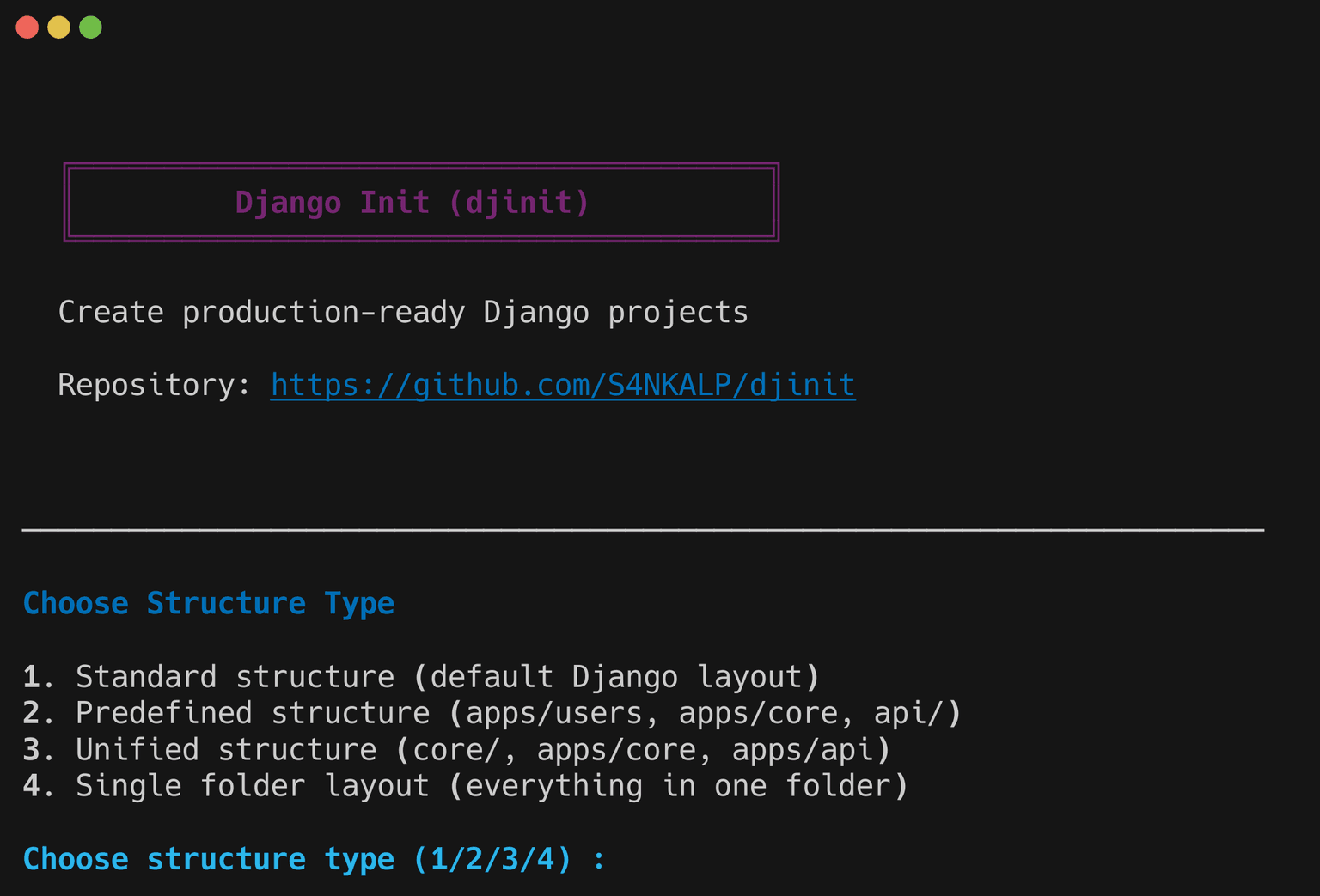
Every project is different, so djinit lets you choose the structure that fits:
- Standard: The classic Django layout we all know.
- Single Folder: Keep it simple. All your apps live in one folder.
- Predefined: Great for bigger projects. It separates
apps/andapi/. - Unified: Clean and minimal. Everything lives under
core/andapps/.
Add Apps in a Snap
Need to add a users app or a products app? Don’t create folders manually. Just tell djinit:
dj app users productsIt creates the apps and here is the best part it automatically adds them to your INSTALLED_APPS setting.
Generate Secret Keys
Need a Django secret key? Don’t search online for random generators:
dj secretThis generates a secure 50 character secret key. Need more keys or a different length?
dj secret --count 5        # Generate 5 keys
dj secret --length 64      # Generate a 64 character key
dj secret --count 3 --length 32 # 3 keys, each 32 charactersImportant Note:
djinitbuilds the house, but you have to put the furniture in it. It sets up the structure and configuration, but it does not write your business logic, models, or views. That fun part is still all yours!
Future Plans
I am not done yet! I am constantly working to make djinit better. Here is what is on my wishlist:
- Docker Support: Auto generating
Dockerfileso you can containerize easily. - Frontend Integration: Options to scaffold React, Vue, or HTMX right alongside Django.
- Celery: Making background tasks easier to set up.
- More Packages: Integrating other popular packages to help you build feature rich apps effortlessly.
Conclusion
djinit was born from frustration, but it was built with love for the Django community. It removes the boring setup phase so you can focus on what matters: building your application.
Give it a try. If it saves you even 10 minutes of configuration hell, then it did its job.
Happy Coding!